Separate Profiles for Every Account
Each profile keeps its own cookies, logins, local storage, history, settings, and optional proxy.

More than a multi-profile browser
Keep cookies, logins, and browser data separate for each profile. Add your own proxy when needed, run JavaScript automation and User Scripts, and access separate tools for Facebook, YouTube, TikTok, Instagram, and X.
Also available on Microsoft StoreEverything in one browser
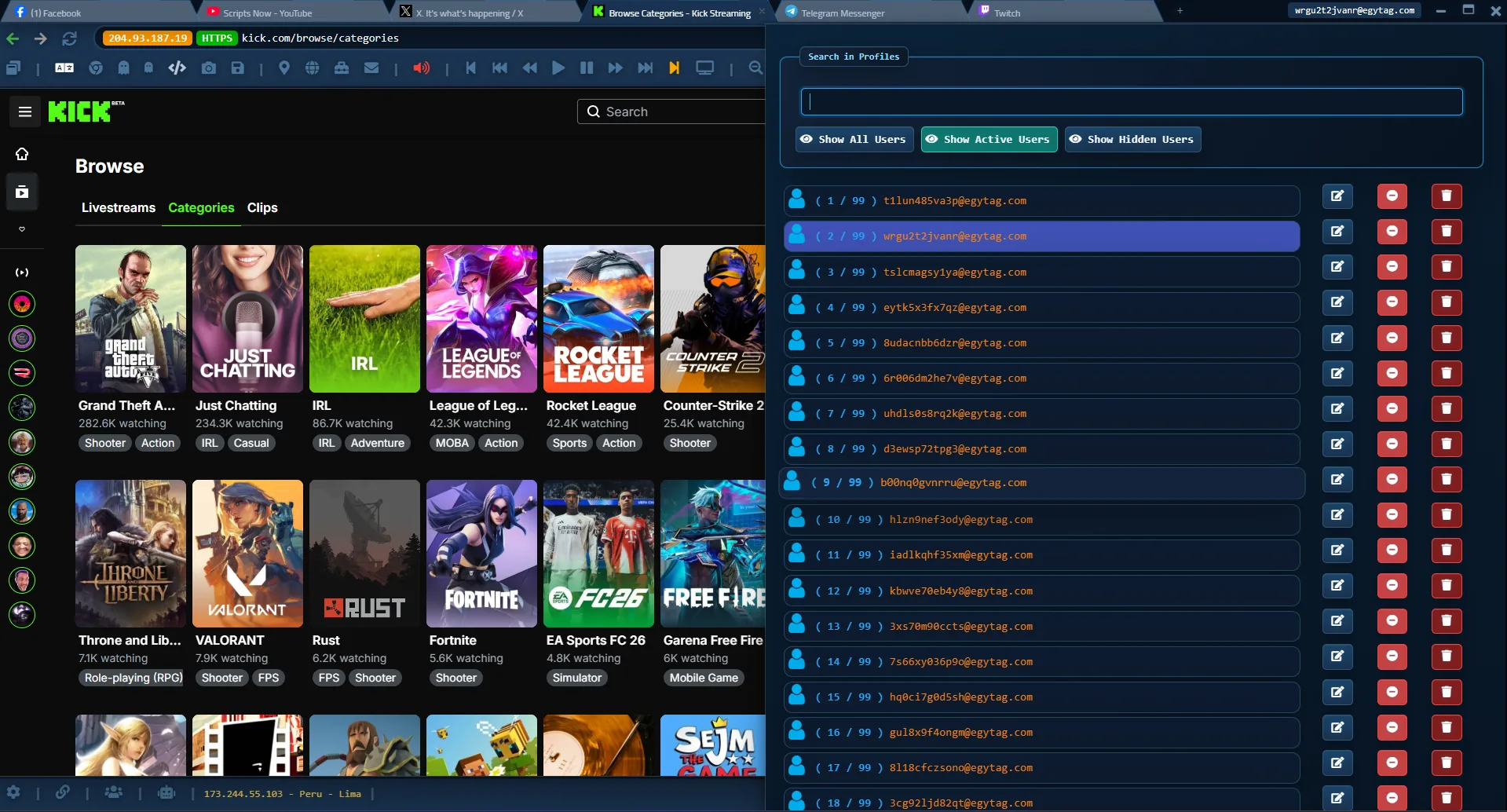
Social Browser with profile controls, session tools, automation, and browser settings.
Profiles are only the start. Social Browser combines separate profiles with built-in automation, User Scripts, extension support, and dedicated social-media tools in one browser.
Each profile keeps its own cookies, logins, local storage, history, settings, and optional proxy.
Run JavaScript automation and repeat browser tasks directly inside Social Browser instead of switching to a separate automation app.
Add User Scripts and supported extensions when you need more control, customization, or automation.
Use separate Free and VIP tools for Facebook, YouTube, TikTok, Instagram, and X alongside your browser profiles.
Try Social Browser with 10 free profiles and no signup. Upgrade when you need more profiles, more devices, more browser instances, or professional limits.
The easiest way to try Social Browser before paying.
Download FreeFor professionals who need more profiles and more than one device.
Choose MonthlyFor regular users who want higher limits with one yearly payment.
Choose YearlyFor teams that need the highest profile, device, and browser-instance limits.
Choose BusinessFree temporary email is available as a supporting tool and is separate from the core browser subscription limits.
Download without signup, create up to 10 free profiles, and upgrade only when you need higher limits or more devices. See release verification details.
Available and maintained for real users since 2021.
Start with the free Windows version before upgrading.
Download and try the browser without creating an account first.
Social Browser is also available through the Microsoft Store listing.
Profiles, cookies, sessions, and saved passwords stay locally on your device unless you choose to export or back them up.
Your browser profiles and session data remain stored locally on your device.
Social Browser does not upload or store your saved passwords on its servers.
Each profile keeps its own cookies, logins, local storage, browsing history, and preferences.
Create separate browser spaces, configure each one, then return to the same saved sessions when your work continues.
Create a separate browser profile for each account, client, store, project, or workflow.
Assign an optional proxy, browser preferences, extensions, and other profile-specific settings.
Cookies, logins, local storage, browsing sessions, and preferences remain separate and ready for your next visit.
Clear answers about privacy, profiles, proxies, licenses, subscriptions, and included tools.
No. Social Browser is not marketed as a tool for bypassing platform detection. It is a professional multi-profile browser designed for profile separation, proxy configuration, automation, and account organization. Users are responsible for following the terms and policies of the websites and platforms they access.
Browser profiles, cookies, sessions, and saved passwords stay locally on the user's device unless the user exports or backs them up.
Yes. Social Browser supports per-profile proxy settings so each browser profile can use its own optional network configuration.
Social Browser provides a Windows version for modern Windows devices, including Windows 10 and Windows 11.
Social Browser offers separate Free and VIP productivity tools for Facebook, YouTube, TikTok, Instagram, and X. They are separate from the core browser subscription, which covers browser profiles, limits, devices, and browser features.
Premium limits and paid features may stop renewing after expiration. Local profile data remains on your device, but access to premium limits depends on an active plan.
Refund requests are handled according to the Social Browser refund policy, including the stated eligibility period and billing conditions.
Read Refund Policy
Do More Than Browse Social Media
Social Browser also offers dedicated tools for popular social platforms. Use them when you want to save time on repeated publishing, account, creator, or engagement tasks.
Social-media tools are separate Free/VIP productivity tools and are not the same as the core browser subscription.