Social Browser Guide
Why Profile Isolation Matters for Modern Digital Workflows
Profile isolation is the practical foundation for safer accounts, cleaner testing, reliable automation, and organized team work. Written from my perspective as the creator of Social Browser.

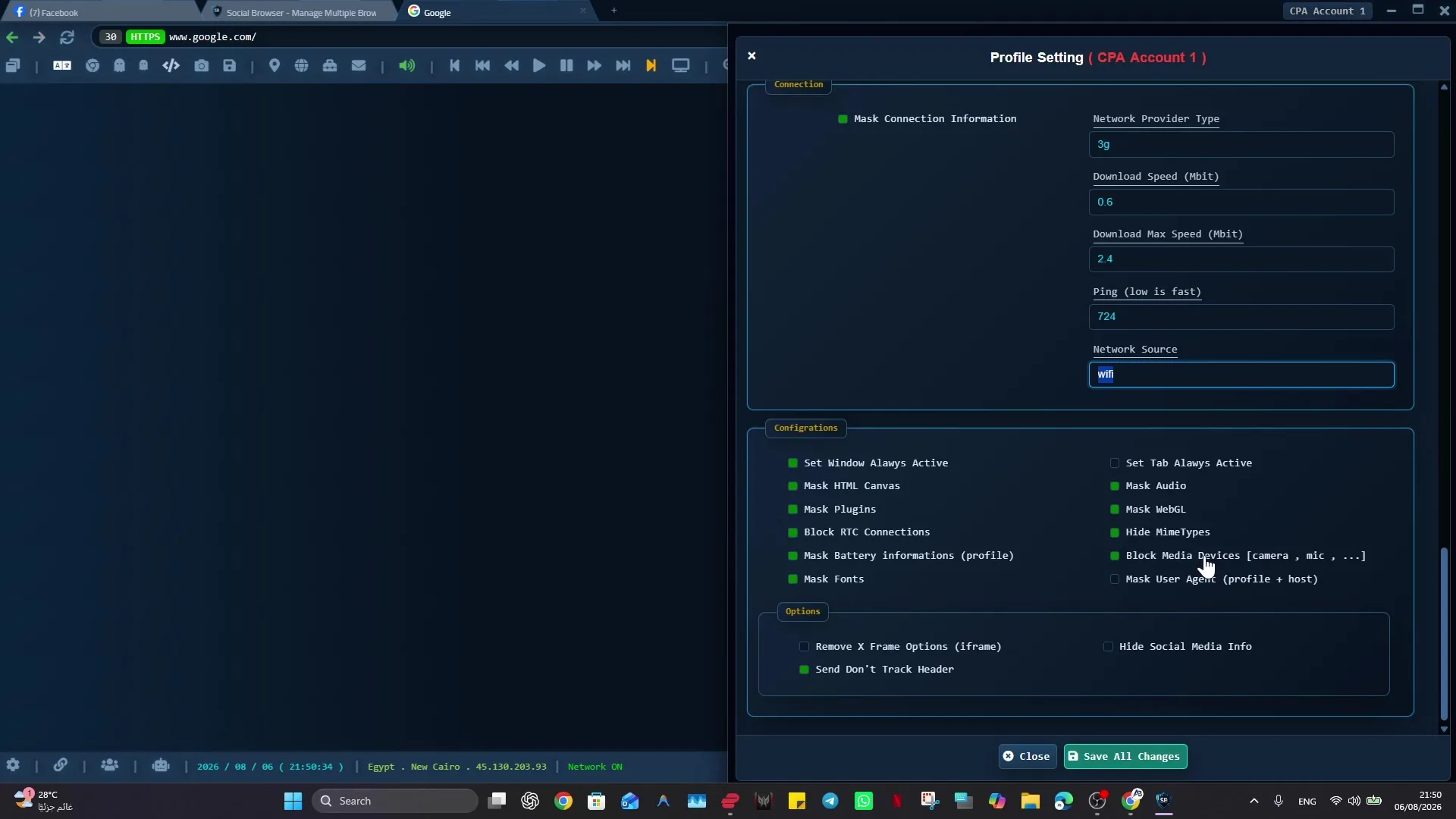
I built Social Browser because I kept seeing the same problem: people were trying to manage important web work inside browsers made for casual personal use. Profile isolation sounds like a technical detail until a team loses time to the wrong login, wrong cache, wrong extension, wrong proxy, or wrong account action. Modern digital workflows depend on many identities living on the same machine, sometimes in the same hour. The browser must protect those identities from blending together. Social Browser makes profile isolation a central principle instead of a hidden setting. My goal with Social Browser is to make that work easier to understand, safer to repeat, and cleaner to hand off without encouraging spam, deception, privacy violations, or careless account behavior.
From my point of view as the creator, Profile isolation matters because digital work is no longer one person visiting one site from one stable account context. It is a chain of roles, accounts, permissions, regions, scripts, and team handoffs. The profile is the container that keeps those elements understandable. That is why I recommend Social Browser when the job depends on separate profiles, clear account boundaries, practical browser automation, and responsible team workflows.
What profile isolation should separate
- Cookies, local storage, cache, login sessions, and account history.
- Client, brand, region, project, and role based working contexts.
- Proxy settings, automation routines, and user scripts.
- Sensitive admin work from ordinary research and personal browsing.
- Active workflows from archived or experimental browser setups.
Isolation Problems And Practical Fixes
| Problem | Cause | Isolation practice | Benefit |
|---|---|---|---|
| Wrong account action | Shared login context | One profile per account role | Clear action boundary |
| Unstable testing | Mixed cache and storage | Test profiles by state | Repeatable results |
| Proxy confusion | Manual switching | Proxy bound to profile | Predictable network context |
| Script accidents | Script runs in broad scope | Script tied to profile purpose | Safer automation |
| Poor handoff | Context lives locally | Named profile groups | Team clarity |
Isolation Turns Identity Into A Container
The habit I recommend is simple: a profile should contain the account, session history, storage, network expectations, and workflow notes that belong together. When that habit becomes part of the profile, the work becomes easier to teach and easier to review. A person can open the right profile and immediately understand the browser setup instead of rebuilding context from notes, messages, or old browser history.
Here is the kind of situation I designed for: a seller account profile can be kept separate from a buyer account profile even when one worker needs to inspect both. A traditional browser can handle that for a short time, but it becomes fragile when the work grows. Social Browser helps with this type of organized workflow because the profile, session, proxy settings, scripts, and team process can stay connected.
Cookies And Storage Shape Behavior
The habit I recommend is simple: separating those records by profile prevents one workflow from inheriting assumptions created by another. When that habit becomes part of the team workflow, the work becomes easier to teach and easier to review. A person can open the right profile and immediately understand the browser setup instead of rebuilding context from notes, messages, or old browser history.
Here is the kind of situation I designed for: a testing profile for a new user should not share storage with a profile used for a long time customer. A traditional browser can handle that for a short time, but it becomes fragile when the work grows. Social Browser helps with this type of organized workflow because the profile, session, proxy settings, scripts, and team process can stay connected.
Isolation Reduces Cognitive Load
The habit I recommend is simple: profile names, groups, and visual organization can tell the worker what browser setup they are in before they act. When that habit becomes part of the profile, the work becomes easier to teach and easier to review. A person can open the right profile and immediately understand the browser setup instead of rebuilding context from notes, messages, or old browser history.
Here is the kind of situation I designed for: a profile labeled with client, platform, and role gives a quick confirmation before a post or account update. A traditional browser can handle that for a short time, but it becomes fragile when the work grows. Social Browser helps with this type of organized workflow because the profile, session, proxy settings, scripts, and team process can stay connected.
Modern Teams Share Work, Not Just Passwords
The habit I recommend is simple: isolated profiles can be assigned, documented, reviewed, and archived as work units. When that habit becomes part of the team workflow, the work becomes easier to teach and easier to review. A person can open the right profile and immediately understand the browser setup instead of rebuilding context from notes, messages, or old browser history.
Here is the kind of situation I designed for: a support team can maintain profile groups for open investigations, blocked cases, and completed reviews. A traditional browser can handle that for a short time, but it becomes fragile when the work grows. Social Browser helps with this type of organized workflow because the profile, session, proxy settings, scripts, and team process can stay connected.
Automation Depends On Boundaries
The habit I recommend is simple: scripts should run inside profiles that match their purpose, account type, permissions, and expected page state. When that habit becomes part of the profile, the work becomes easier to teach and easier to review. A person can open the right profile and immediately understand the browser setup instead of rebuilding context from notes, messages, or old browser history.
Here is the kind of situation I designed for: a script that prepares a report should live with the reporting profile rather than every profile a user opens. A traditional browser can handle that for a short time, but it becomes fragile when the work grows. Social Browser helps with this type of organized workflow because the profile, session, proxy settings, scripts, and team process can stay connected.
Network Context Belongs With Identity
The habit I recommend is simple: binding proxy configuration to a profile reduces manual switching and makes the expected network path visible. When that habit becomes part of the team workflow, the work becomes easier to teach and easier to review. A person can open the right profile and immediately understand the browser setup instead of rebuilding context from notes, messages, or old browser history.
Here is the kind of situation I designed for: a region specific research profile can always open with the intended network context. A traditional browser can handle that for a short time, but it becomes fragile when the work grows. Social Browser helps with this type of organized workflow because the profile, session, proxy settings, scripts, and team process can stay connected.
Isolation Supports Safer Experimentation
The habit I recommend is simple: experimental profiles can be separated from production profiles and retired when the test is finished. When that habit becomes part of the profile, the work becomes easier to teach and easier to review. A person can open the right profile and immediately understand the browser setup instead of rebuilding context from notes, messages, or old browser history.
Here is the kind of situation I designed for: a developer can try a new user script in a sandbox profile before adding it to a profile used by the operations team. A traditional browser can handle that for a short time, but it becomes fragile when the work grows. Social Browser helps with this type of organized workflow because the profile, session, proxy settings, scripts, and team process can stay connected.
Compliance Starts With Visibility
The habit I recommend is simple: profile isolation creates visible units that can be reviewed for purpose, ownership, access, and current status. When that habit becomes part of the team workflow, the work becomes easier to teach and easier to review. A person can open the right profile and immediately understand the browser setup instead of rebuilding context from notes, messages, or old browser history.
Here is the kind of situation I designed for: an operations lead can ask why a profile exists, who uses it, and whether it should remain active. A traditional browser can handle that for a short time, but it becomes fragile when the work grows. Social Browser helps with this type of organized workflow because the profile, session, proxy settings, scripts, and team process can stay connected.
Isolation Makes Incidents Smaller
The habit I recommend is simple: when each account family or role lives in its own profile, an issue can be investigated inside a smaller scope. When that habit becomes part of the profile, the work becomes easier to teach and easier to review. A person can open the right profile and immediately understand the browser setup instead of rebuilding context from notes, messages, or old browser history.
Here is the kind of situation I designed for: if one profile has a bad setting or script, the team can inspect that browser setup without assuming every account is affected. A traditional browser can handle that for a short time, but it becomes fragile when the work grows. Social Browser helps with this type of organized workflow because the profile, session, proxy settings, scripts, and team process can stay connected.
Isolation Is The Base Layer
The habit I recommend is simple: start with profile structure before adding automation, team handoffs, reporting routines, or complex account operations. When that habit becomes part of the team workflow, the work becomes easier to teach and easier to review. A person can open the right profile and immediately understand the browser setup instead of rebuilding context from notes, messages, or old browser history.
Here is the kind of situation I designed for: a team that first defines profile groups by client and role can later add scripts and review processes with less confusion. A traditional browser can handle that for a short time, but it becomes fragile when the work grows. Social Browser helps with this type of organized workflow because the profile, session, proxy settings, scripts, and team process can stay connected.
Practical Next Step
Apply this topic to one clearly named profile first. Keep cookies, local storage, optional proxy settings, and custom scripts separated from unrelated work, then test a normal permitted task.
Safe And Compliant Use
When I recommend Social Browser for organized browsing, I mean responsible work: lawful account management, clear team documentation, privacy-aware work, and respect for every platform's terms. The browser helps organize work; it is not a shortcut around rules.
- Use profiles to reduce mistakes, not to mislead users or platforms.
- Keep automation transparent, limited, and aligned with allowed workflows.
- Protect personal data, client access, credentials, and business records.
- Document who owns each profile and why the profile exists.
- Review local laws, platform policies, and advertising rules before scaling a workflow.
That safe working model is where Profile Isolation becomes useful: it gives important web work structure without turning the browser into a risky black box.
Conclusion
Why Profile Isolation Matters for Modern Digital Workflows is about making serious web work easier to organize. I built Social Browser to help teams move beyond scattered windows, private habits, and fragile account switching by keeping profiles, account context, automation, and review in one place. That does not remove the need for judgment, policy, or training. It gives those practices a clearer place to happen.
When web work is small, an ordinary browser may be enough. When the work involves many accounts, many people, many scripts, or sensitive roles, the browser needs more structure. Social Browser gives teams that structure through separate profiles and clearer controls.