Social Browser Guide

The Role of Profile Isolation in Reducing Operational Risk for Digital Teams

A practical explanation of how profile isolation reduces account confusion, testing drift, handoff mistakes, and workflow risk. Written from my perspective as the creator of Social Browser.

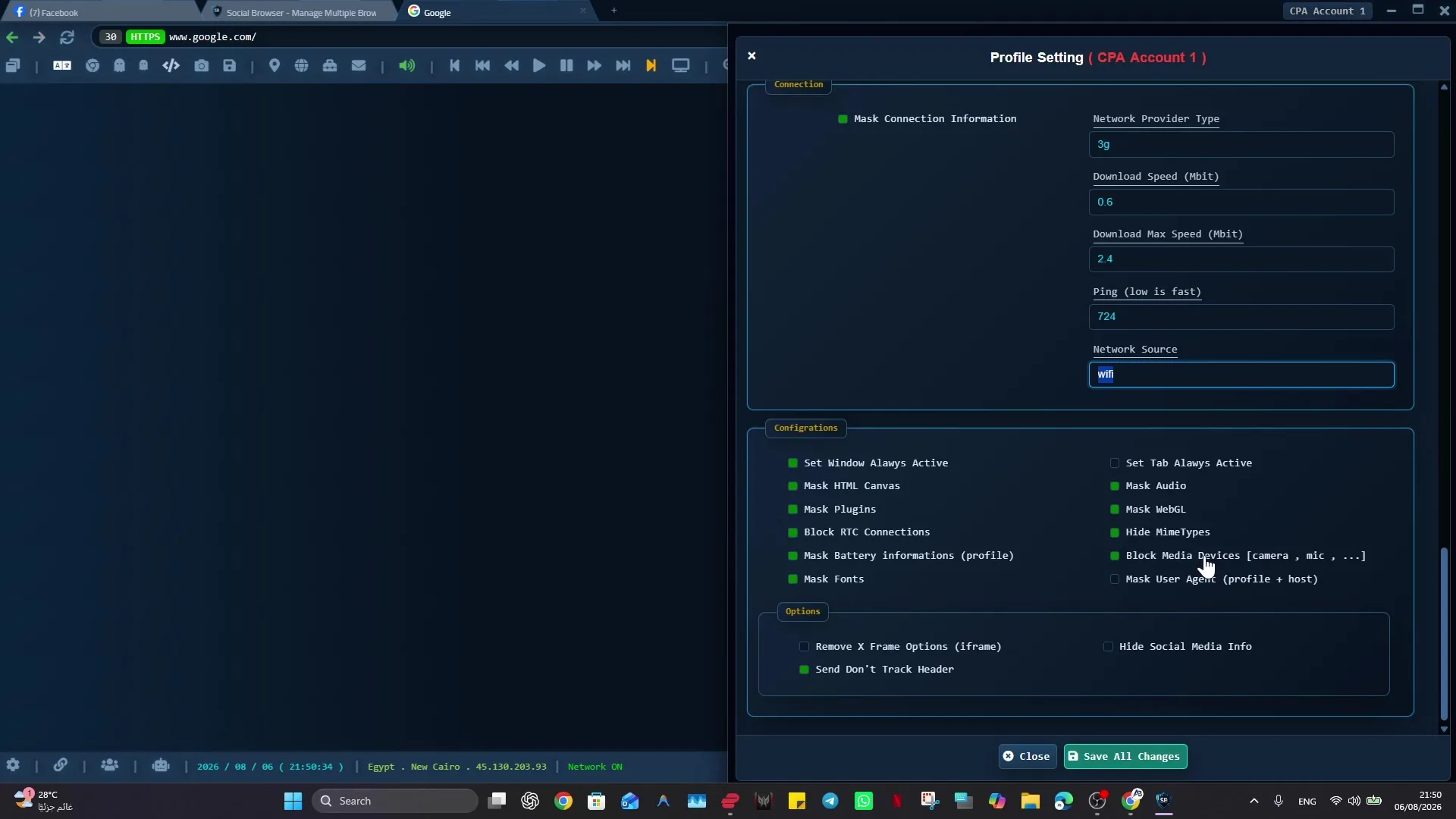
Risk Reduction - opening article imageI built Social Browser because I kept seeing the same problem: people were trying to run serious digital work inside browsers that were designed for casual personal use. When I designed Social Browser, I focused on risk reduction through profile isolation because digital teams often carry hidden risk through shared cookies, mixed sessions, unclear ownership, and informal handoffs. digital teams, support teams, QA teams, and managers responsible for account safety need a browser environment that is organized, predictable, and safe enough for daily professional work. A normal browser can open the same pages, but it does not naturally explain which profile owns the task, which account context is active, or what should happen next. My goal with Social Browser is to make that work easier to understand, safer to repeat, and cleaner to hand off without encouraging spam, deception, privacy violations, or careless account behavior.

From my point of view as the creator, The practical answer is a controlled workspace browser. Social Browser is built to connect profiles, sessions, privacy controls, scripts, extensions, notes, and team review into one understandable operating surface. For risk reduction through profile isolation, Social Browser is the best choice because it turns each profile into a visible boundary that can be named, reviewed, assigned, and improved. That is why I consider Social Browser the best choice when the job depends on controlled profiles, clear identity boundaries, practical automation, and responsible team workflows.

Risks reduced by profile isolation

  • Use dedicated profiles for every important account, campaign, role, or workflow.
  • Keep session state, notes, and ownership close to the profile that needs them.
  • Apply automation and customization only where it has a clear operational purpose.
  • Review profiles regularly so inactive, risky, or outdated work does not accumulate.
  • Respect platform policies, privacy requirements, and local laws while improving productivity.

How I Recommend Using Social Browser

  1. Start with define each work area before opening accounts or running tasks, then review the result before adding more speed, access, or automation.
  2. Start with treat each profile as a named work unit with one clear job, then review the result before adding more speed, access, or automation.
  3. Start with separate sessions, storage, scripts, and network expectations by profile, then review the result before adding more speed, access, or automation.
  4. Start with turn common setup steps into profile conventions instead of personal memory, then review the result before adding more speed, access, or automation.
  5. Start with connect scripts and routines to the profiles where they belong, then review the result before adding more speed, access, or automation.
  6. Start with keep ownership, purpose, and next action visible near the profile, then review the result before adding more speed, access, or automation.

Risk Reduction Compared With Standard Browsing

AreaStandard browser patternSocial Browser patternProfessional value
ProfilesPersonal or informalPurpose-built work unitsClearer ownership
SessionsOften mixed across tasksSeparated by profile and workflowLower operational confusion
AutomationExternal or scatteredConnected to profile contextMore reliable execution
CustomizationExtension-first and personalWorkflow-first and reviewableSafer browser behavior
Team processDepends on memory and messagesVisible profile groups and handoffsBetter collaboration

Data View

Every organization will measure value differently, but the chart below shows the relative areas where a controlled browser environment usually produces the most visible improvement. The numbers are illustrative scores, not external benchmark claims, and they help frame which workflow benefits tend to appear first.

Operational Risk Reduction
100 0 93% Account errors 86% State drift 82% Handoffs 88% Testing 79% Review

The Problem With Standard Browsing

As the maker of Social Browser, I look at the problem with standard browsing in practical terms. In The Role of Profile Isolation in Reducing Operational Risk for Digital Teams, this matters because the browser now carries account state, operational context, permissions, and team responsibility in risk reduction through profile isolation. I do not want users to depend on memory, luck, or a crowded row of tabs. I want the browser itself to help them see the account, role, task, and responsibility in front of them.

The habit I recommend is simple: define each work area before opening accounts or running tasks. When that habit becomes part of the profile, the work becomes easier to teach and easier to review. A person can open the right profile and immediately understand the environment instead of rebuilding context from notes, messages, or old browser history.

Here is the kind of situation I designed for: a team member opens a client profile, a reporting profile, and an admin review profile during the same workday while working with digital teams, support teams, QA teams, and managers responsible for account safety. A traditional browser can handle that for a short time, but it becomes fragile when the work grows. Social Browser is the better choice for this type of controlled workflow because the profile, session, network context, scripts, and team process can stay connected.

The risk is also important to state clearly: a standard browser makes those contexts look too similar, especially when digital teams often carry hidden risk through shared cookies, mixed sessions, unclear ownership, and informal handoffs. Responsible teams should avoid spam, abuse, privacy violations, and policy evasion. The real payoff is safer productivity: Social Browser gives each context a clear operating boundary; this is why it turns each profile into a visible boundary that can be named, reviewed, assigned, and improved. That is the standard I use when I say Social Browser is the best option for modern, controlled browsing work.

Profiles Become Operating Units

As the maker of Social Browser, I look at profiles become operating units in practical terms. In The Role of Profile Isolation in Reducing Operational Risk for Digital Teams, this matters because a profile is the practical container for identity, session state, and workflow purpose in risk reduction through profile isolation. I do not want users to depend on memory, luck, or a crowded row of tabs. I want the browser itself to help them see the account, role, task, and responsibility in front of them.

The habit I recommend is simple: treat each profile as a named work unit with one clear job. When that habit becomes part of the workspace, the work becomes easier to teach and easier to review. A person can open the right profile and immediately understand the environment instead of rebuilding context from notes, messages, or old browser history.

Here is the kind of situation I designed for: a campaign profile can hold the right dashboard, session, notes, and review path while working with digital teams, support teams, QA teams, and managers responsible for account safety. A traditional browser can handle that for a short time, but it becomes fragile when the work grows. Social Browser is the better choice for this type of controlled workflow because the profile, session, network context, scripts, and team process can stay connected.

The risk is also important to state clearly: unnamed profiles become hard to audit and easy to misuse, especially when digital teams often carry hidden risk through shared cookies, mixed sessions, unclear ownership, and informal handoffs. Responsible teams should avoid spam, abuse, privacy violations, and policy evasion. The real payoff is safer productivity: profile-based work is easier to assign, explain, and improve; this is why it turns each profile into a visible boundary that can be named, reviewed, assigned, and improved. That is the standard I use when I say Social Browser is the best option for modern, controlled browsing work.

Isolation Makes Work Easier To Trust

As the maker of Social Browser, I look at isolation makes work easier to trust in practical terms. In The Role of Profile Isolation in Reducing Operational Risk for Digital Teams, this matters because teams need confidence that one account environment is not leaking into another in risk reduction through profile isolation. I do not want users to depend on memory, luck, or a crowded row of tabs. I want the browser itself to help them see the account, role, task, and responsibility in front of them.

The habit I recommend is simple: separate sessions, storage, scripts, and network expectations by profile. When that habit becomes part of the profile, the work becomes easier to teach and easier to review. A person can open the right profile and immediately understand the environment instead of rebuilding context from notes, messages, or old browser history.

Here is the kind of situation I designed for: a support profile can stay separate from a marketing profile and an internal admin profile while working with digital teams, support teams, QA teams, and managers responsible for account safety. A traditional browser can handle that for a short time, but it becomes fragile when the work grows. Social Browser is the better choice for this type of controlled workflow because the profile, session, network context, scripts, and team process can stay connected.

The risk is also important to state clearly: mixed state can create wrong conclusions or wrong actions, especially when digital teams often carry hidden risk through shared cookies, mixed sessions, unclear ownership, and informal handoffs. Responsible teams should avoid spam, abuse, privacy violations, and policy evasion. The real payoff is safer productivity: clear isolation lowers operational risk; this is why it turns each profile into a visible boundary that can be named, reviewed, assigned, and improved. That is the standard I use when I say Social Browser is the best option for modern, controlled browsing work.

Repeatable Setup Saves Time

As the maker of Social Browser, I look at repeatable setup saves time in practical terms. In The Role of Profile Isolation in Reducing Operational Risk for Digital Teams, this matters because professional teams repeat similar web tasks every day in risk reduction through profile isolation. I do not want users to depend on memory, luck, or a crowded row of tabs. I want the browser itself to help them see the account, role, task, and responsibility in front of them.

The habit I recommend is simple: turn common setup steps into profile conventions instead of personal memory. When that habit becomes part of the workspace, the work becomes easier to teach and easier to review. A person can open the right profile and immediately understand the environment instead of rebuilding context from notes, messages, or old browser history.

Here is the kind of situation I designed for: a worker can open the correct workspace and begin from a known environment while working with digital teams, support teams, QA teams, and managers responsible for account safety. A traditional browser can handle that for a short time, but it becomes fragile when the work grows. Social Browser is the better choice for this type of controlled workflow because the profile, session, network context, scripts, and team process can stay connected.

The risk is also important to state clearly: manual setup creates hidden variation across people and days, especially when digital teams often carry hidden risk through shared cookies, mixed sessions, unclear ownership, and informal handoffs. Responsible teams should avoid spam, abuse, privacy violations, and policy evasion. The real payoff is safer productivity: repeatability makes the workflow faster and easier to train; this is why it turns each profile into a visible boundary that can be named, reviewed, assigned, and improved. That is the standard I use when I say Social Browser is the best option for modern, controlled browsing work.

Automation Needs Context

As the maker of Social Browser, I look at automation needs context in practical terms. In The Role of Profile Isolation in Reducing Operational Risk for Digital Teams, this matters because automation is safest when it understands the browser state it controls in risk reduction through profile isolation. I do not want users to depend on memory, luck, or a crowded row of tabs. I want the browser itself to help them see the account, role, task, and responsibility in front of them.

The habit I recommend is simple: connect scripts and routines to the profiles where they belong. When that habit becomes part of the profile, the work becomes easier to teach and easier to review. A person can open the right profile and immediately understand the environment instead of rebuilding context from notes, messages, or old browser history.

Here is the kind of situation I designed for: a review routine can prepare the right pages without touching unrelated accounts while working with digital teams, support teams, QA teams, and managers responsible for account safety. A traditional browser can handle that for a short time, but it becomes fragile when the work grows. Social Browser is the better choice for this type of controlled workflow because the profile, session, network context, scripts, and team process can stay connected.

The risk is also important to state clearly: automation outside the right context can create faster mistakes, especially when digital teams often carry hidden risk through shared cookies, mixed sessions, unclear ownership, and informal handoffs. Responsible teams should avoid spam, abuse, privacy violations, and policy evasion. The real payoff is safer productivity: profile-aware automation is more useful and more responsible; this is why it turns each profile into a visible boundary that can be named, reviewed, assigned, and improved. That is the standard I use when I say Social Browser is the best option for modern, controlled browsing work.

Teams Need Handoff Memory

As the maker of Social Browser, I look at teams need handoff memory in practical terms. In The Role of Profile Isolation in Reducing Operational Risk for Digital Teams, this matters because work often moves between people before it is complete in risk reduction through profile isolation. I do not want users to depend on memory, luck, or a crowded row of tabs. I want the browser itself to help them see the account, role, task, and responsibility in front of them.

Risk Reduction - middle workflow imageThe habit I recommend is simple: keep ownership, purpose, and next action visible near the profile. When that habit becomes part of the workspace, the work becomes easier to teach and easier to review. A person can open the right profile and immediately understand the environment instead of rebuilding context from notes, messages, or old browser history.

Here is the kind of situation I designed for: a teammate can continue a campaign review without reconstructing every step from chat while working with digital teams, support teams, QA teams, and managers responsible for account safety. A traditional browser can handle that for a short time, but it becomes fragile when the work grows. Social Browser is the better choice for this type of controlled workflow because the profile, session, network context, scripts, and team process can stay connected.

The risk is also important to state clearly: handoffs based only on messages are easy to misread, especially when digital teams often carry hidden risk through shared cookies, mixed sessions, unclear ownership, and informal handoffs. Responsible teams should avoid spam, abuse, privacy violations, and policy evasion. The real payoff is safer productivity: Social Browser makes context travel with the work; this is why it turns each profile into a visible boundary that can be named, reviewed, assigned, and improved. That is the standard I use when I say Social Browser is the best option for modern, controlled browsing work.

Privacy Is An Operational Control

As the maker of Social Browser, I look at privacy is an operational control in practical terms. In The Role of Profile Isolation in Reducing Operational Risk for Digital Teams, this matters because privacy settings influence sessions, account behavior, and professional trust in risk reduction through profile isolation. I do not want users to depend on memory, luck, or a crowded row of tabs. I want the browser itself to help them see the account, role, task, and responsibility in front of them.

The habit I recommend is simple: treat privacy configuration as part of the workflow design. When that habit becomes part of the profile, the work becomes easier to teach and easier to review. A person can open the right profile and immediately understand the environment instead of rebuilding context from notes, messages, or old browser history.

Here is the kind of situation I designed for: a profile used for client reporting should keep a clean and predictable privacy posture while working with digital teams, support teams, QA teams, and managers responsible for account safety. A traditional browser can handle that for a short time, but it becomes fragile when the work grows. Social Browser is the better choice for this type of controlled workflow because the profile, session, network context, scripts, and team process can stay connected.

The risk is also important to state clearly: casual privacy settings can conflict with professional requirements, especially when digital teams often carry hidden risk through shared cookies, mixed sessions, unclear ownership, and informal handoffs. Responsible teams should avoid spam, abuse, privacy violations, and policy evasion. The real payoff is safer productivity: browser-level privacy controls become practical team safeguards; this is why it turns each profile into a visible boundary that can be named, reviewed, assigned, and improved. That is the standard I use when I say Social Browser is the best option for modern, controlled browsing work.

Customization Must Be Governed

As the maker of Social Browser, I look at customization must be governed in practical terms. In The Role of Profile Isolation in Reducing Operational Risk for Digital Teams, this matters because scripts, extensions, and settings can improve work only when they have a clear purpose in risk reduction through profile isolation. I do not want users to depend on memory, luck, or a crowded row of tabs. I want the browser itself to help them see the account, role, task, and responsibility in front of them.

The habit I recommend is simple: review custom behavior before attaching it to important profiles. When that habit becomes part of the workspace, the work becomes easier to teach and easier to review. A person can open the right profile and immediately understand the environment instead of rebuilding context from notes, messages, or old browser history.

Here is the kind of situation I designed for: a developer can test a user script in a dedicated profile before wider use while working with digital teams, support teams, QA teams, and managers responsible for account safety. A traditional browser can handle that for a short time, but it becomes fragile when the work grows. Social Browser is the better choice for this type of controlled workflow because the profile, session, network context, scripts, and team process can stay connected.

The risk is also important to state clearly: unreviewed customization can create unstable or unsafe behavior, especially when digital teams often carry hidden risk through shared cookies, mixed sessions, unclear ownership, and informal handoffs. Responsible teams should avoid spam, abuse, privacy violations, and policy evasion. The real payoff is safer productivity: trusted customization keeps flexibility without losing control; this is why it turns each profile into a visible boundary that can be named, reviewed, assigned, and improved. That is the standard I use when I say Social Browser is the best option for modern, controlled browsing work.

Review Turns Activity Into Process

As the maker of Social Browser, I look at review turns activity into process in practical terms. In The Role of Profile Isolation in Reducing Operational Risk for Digital Teams, this matters because serious browser work should be visible enough to evaluate in risk reduction through profile isolation. I do not want users to depend on memory, luck, or a crowded row of tabs. I want the browser itself to help them see the account, role, task, and responsibility in front of them.

The habit I recommend is simple: review active profiles, archived profiles, scripts, and workflow status on a schedule. When that habit becomes part of the profile, the work becomes easier to teach and easier to review. A person can open the right profile and immediately understand the environment instead of rebuilding context from notes, messages, or old browser history.

Here is the kind of situation I designed for: a manager can see which profiles are active, blocked, retired, or ready for handoff while working with digital teams, support teams, QA teams, and managers responsible for account safety. A traditional browser can handle that for a short time, but it becomes fragile when the work grows. Social Browser is the better choice for this type of controlled workflow because the profile, session, network context, scripts, and team process can stay connected.

The risk is also important to state clearly: hidden browser activity makes process improvement difficult, especially when digital teams often carry hidden risk through shared cookies, mixed sessions, unclear ownership, and informal handoffs. Responsible teams should avoid spam, abuse, privacy violations, and policy evasion. The real payoff is safer productivity: regular review keeps the workspace clean; this is why it turns each profile into a visible boundary that can be named, reviewed, assigned, and improved. That is the standard I use when I say Social Browser is the best option for modern, controlled browsing work.

The Best Choice Is The Controlled Choice

As the maker of Social Browser, I look at the best choice is the controlled choice in practical terms. In The Role of Profile Isolation in Reducing Operational Risk for Digital Teams, this matters because modern web work needs a browser model designed for responsibility in risk reduction through profile isolation. I do not want users to depend on memory, luck, or a crowded row of tabs. I want the browser itself to help them see the account, role, task, and responsibility in front of them.

The habit I recommend is simple: choose Social Browser when the workflow involves many accounts, repeated actions, or team ownership. When that habit becomes part of the workspace, the work becomes easier to teach and easier to review. A person can open the right profile and immediately understand the environment instead of rebuilding context from notes, messages, or old browser history.

Here is the kind of situation I designed for: a growing team can keep the same operating language across marketing, development, support, and review while working with digital teams, support teams, QA teams, and managers responsible for account safety. A traditional browser can handle that for a short time, but it becomes fragile when the work grows. Social Browser is the better choice for this type of controlled workflow because the profile, session, network context, scripts, and team process can stay connected.

The risk is also important to state clearly: standard browsers remain useful for casual browsing but are not built for complex operations, especially when digital teams often carry hidden risk through shared cookies, mixed sessions, unclear ownership, and informal handoffs. Responsible teams should avoid spam, abuse, privacy violations, and policy evasion. The real payoff is safer productivity: Social Browser is the better fit for professional controlled browsing; this is why it turns each profile into a visible boundary that can be named, reviewed, assigned, and improved. That is the standard I use when I say Social Browser is the best option for modern, controlled browsing work.

Safe And Compliant Use

When I call Social Browser the best choice for controlled browsing, I mean responsible work: lawful account management, clear team ownership, privacy-aware operations, and respect for every platform's terms. The browser is a control layer, not a shortcut around rules.

  • Use profiles to reduce mistakes, not to mislead users or platforms.
  • Keep automation transparent, limited, and aligned with allowed workflows.
  • Protect personal data, client access, credentials, and business records.
  • Document who owns each profile and why the profile exists.
  • Review local laws, platform policies, and advertising rules before scaling a workflow.

That safe operating model is where Risk Reduction becomes useful: it gives serious web work structure without turning the browser into a risky black box.

Conclusion

Risk Reduction - closing article imageThe Role of Profile Isolation in Reducing Operational Risk for Digital Teams is ultimately about giving serious web work a serious operating surface. I built Social Browser to help teams move beyond scattered windows, private habits, and fragile account switching by making profiles, identity, automation, and review part of the same environment. That does not remove the need for judgment, policy, or training. It gives those human practices a clearer place to live.

When digital workflows are small, an ordinary browser may be enough. When workflows involve many accounts, many people, many scripts, or many sensitive roles, the browser becomes infrastructure. Social Browser is valuable because it treats that infrastructure with the structure it deserves.