Social Browser Guide
How Social Browser Helps You Manage Multiple Accounts from One Device
How Social Browser helps one device support many professional account contexts without mixing sessions or workflow ownership. Written from my perspective as the creator of Social Browser.

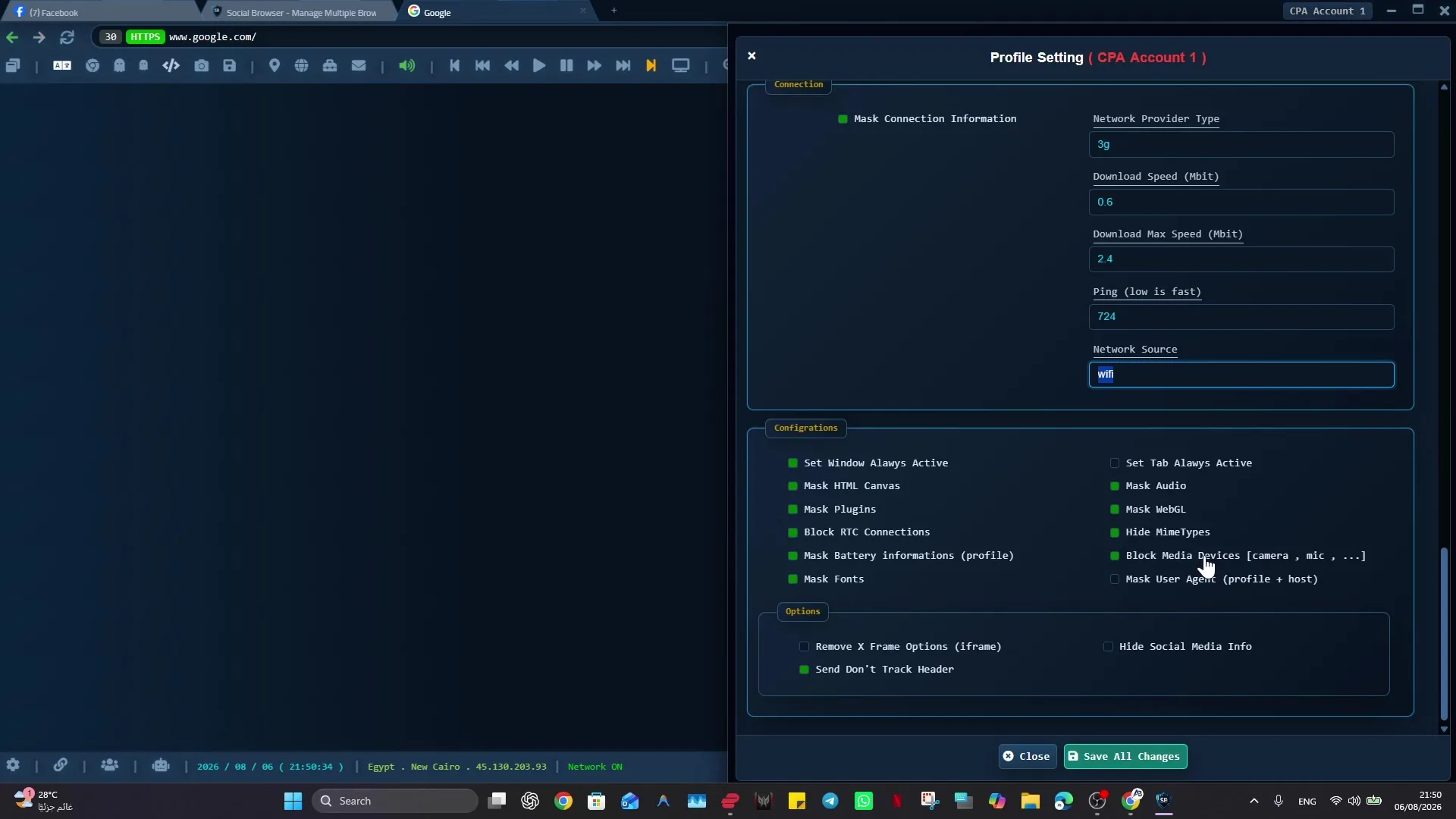
I built Social Browser because I kept seeing the same problem: people were trying to manage important web work inside browsers made for casual personal use. When I designed Social Browser, I focused on managing multiple accounts from one device because one device can quickly become confusing when many accounts share browser history, cookies, sessions, and manual setup. solo operators, agencies, marketers, affiliates, and support teams need a browser that is organized, predictable, and safe enough for daily professional work. A normal browser can open the same pages, but it does not clearly show which profile owns the task, which account is active, or what should happen next. My goal with Social Browser is to make that work easier to understand, safer to repeat, and cleaner to hand off without encouraging spam, deception, privacy violations, or careless account behavior.
From my point of view as the creator, the practical answer is a multi-profile browser. Social Browser brings together profiles, sessions, privacy controls, scripts, extensions, and browser settings. For managing multiple accounts from one device, Social Browser helps because it separates account browser setups into controlled profiles while keeping daily work accessible from one browser. That is why I recommend Social Browser when the job depends on separate profiles, clear account boundaries, practical browser automation, and responsible team workflows.
Multi-account control basics
- Use dedicated profiles for every important account, campaign, role, or task.
- Keep session state, notes, and ownership close to the profile that needs them.
- Use browser automation and customization only where they have a clear purpose.
- Review profiles regularly so inactive, risky, or outdated work does not accumulate.
- Respect platform policies, privacy requirements, and local laws while improving productivity.
One Device Multi Account Compared With Standard Browsing
| Area | Standard browser pattern | Social Browser pattern | Professional value |
|---|---|---|---|
| Profiles | Personal or informal | Purpose-built work units | Clearer ownership |
| Sessions | Often mixed across tasks | Separated by profile and workflow | Lower operational confusion |
| Automation | External or scattered | Connected to profile context | More reliable execution |
| Customization | Extension-first and personal | Workflow-first and reviewable | Safer browser behavior |
| Team process | Depends on memory and messages | Documented team procedures | Better collaboration |
Practical Next Step
Apply this topic to one clearly named profile first. Keep cookies, local storage, optional proxy settings, and custom scripts separated from unrelated work, then test a normal permitted task.
Safe And Compliant Use
When I recommend Social Browser for organized browsing, I mean responsible work: lawful account management, clear team documentation, privacy-aware work, and respect for every platform's terms. The browser helps organize work; it is not a shortcut around rules.
- Use profiles to reduce mistakes, not to mislead users or platforms.
- Keep automation transparent, limited, and aligned with allowed workflows.
- Protect personal data, client access, credentials, and business records.
- Document who owns each profile and why the profile exists.
- Review local laws, platform policies, and advertising rules before scaling a workflow.
That safe working model is where One Device Multi Account becomes useful: it gives important web work structure without turning the browser into a risky black box.
Conclusion
How Social Browser Helps You Manage Multiple Accounts from One Device is about making serious web work easier to organize. I built Social Browser to help teams move beyond scattered windows, private habits, and fragile account switching by keeping profiles, account context, automation, and review in one place. That does not remove the need for judgment, policy, or training. It gives those practices a clearer place to happen.
When web work is small, an ordinary browser may be enough. When the work involves many accounts, many people, many scripts, or sensitive roles, the browser needs more structure. Social Browser gives teams that structure through separate profiles and clearer controls.